What don't heatmaps tell you about your website?
Heatmaps show how people use a page, but they rarely give you enough to compare the same content element across a whole site.

Ask AI to summarize:
 Add as source
The image card on your homepage gets more clicks than the one on your service page. Should you change the service page card, or remove it?
Click counts alone can’t answer that. The homepage probably has more visitors, and its card sits right at the top. On the service page, the same element only appears after a long block of text.
A heatmap helps you see how people use a page. If you want to compare the same content element across different parts of the site, you also need a consistent measurement model.
Without one, a report can be technically correct and still leave out the one thing the decision depends on.
The comparison can flip once you account for visibility
Take three image cards on the same site. The figures below are illustrative, not measured client data.
In this example, an impression means the card met an agreed visibility condition. Loading onto the page isn’t enough.
| Card | Impressions | Clicks | Clicks per impression |
|---|---|---|---|
| A | 1,000 | 80 | 8% |
| B | 200 | 40 | 20% |
| C | 800 | 16 | 2% |
By clicks alone, card A is used the most. Relative to impressions, card B has the highest click rate. Card C gets plenty of impressions but little use.
That doesn’t make B automatically the best card or C a bad one. It does give you a better starting point for working out where the differences come from.
Do the cards serve different purposes? Do they appear on different page types? Is card C aimed at a narrower audience? Can people tell the card is clickable?
A heatmap helps you study a page
A heatmap lets you look at things like where clicks land and how far people scroll. Features vary by tool. In Microsoft Clarity, for example, you can see clicks per element and build a heatmap for a group of pages as well as a single page. Clarity’s heatmap documentation
So heatmaps can cover page groups and individual elements too. But if you want to track how one type of component is seen and used, consistently and across the whole site, it pays to build that measurement into the site’s components.
How are image cards used on different pages? Where do call-to-action sections get seen? On which page types do people open accordions?
For questions like these, I recommend tracking the visibility and usage of content elements.
Shared naming makes elements comparable
Tracking goes on the elements that repeat across the site and have something interactive in them: image cards, news lists, call-to-action sections, file links and accordions.
Each element type gets a permanent name. An image card stays the same element type even when its heading, image or target page changes.
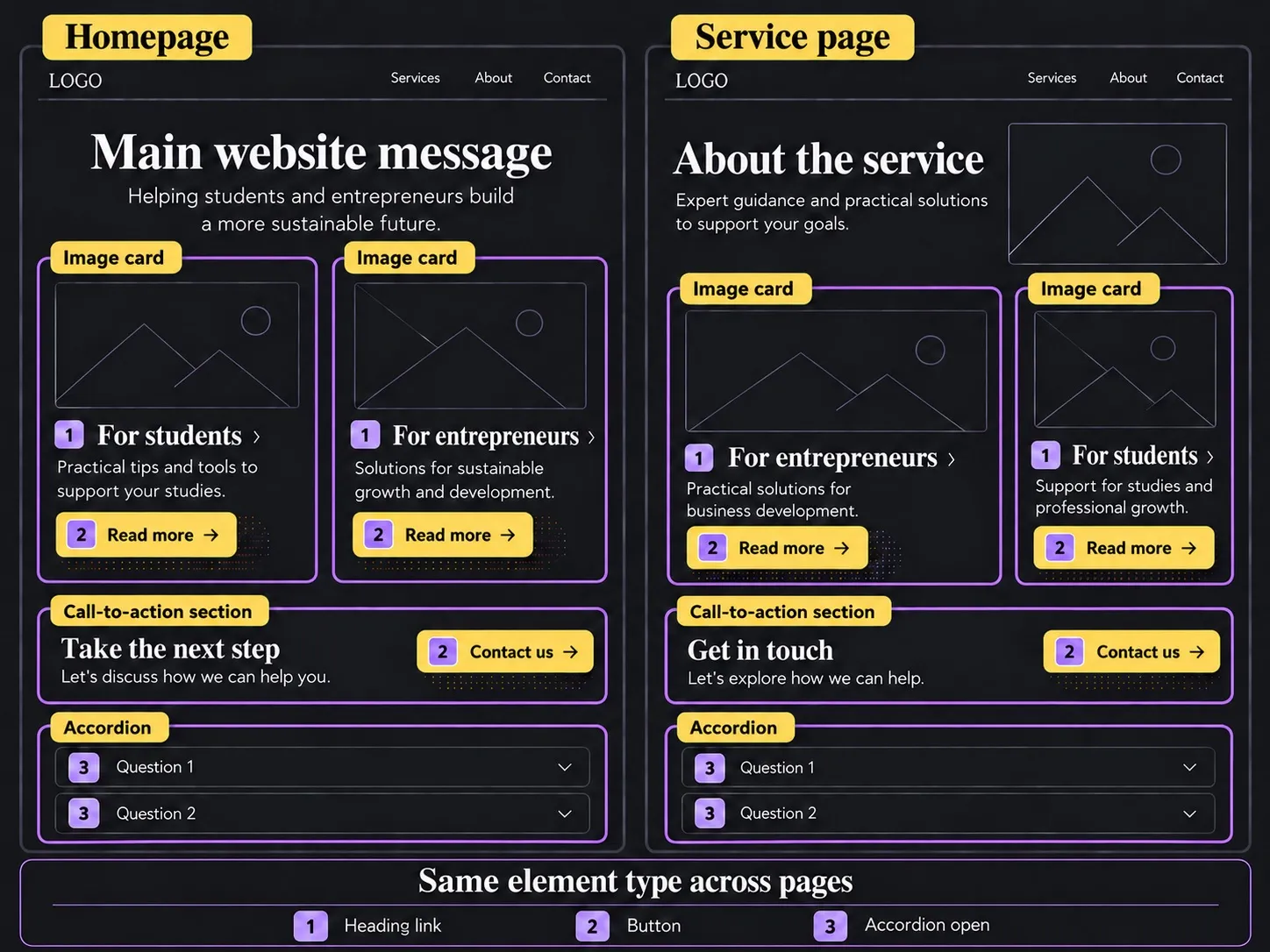
Use the same element type and action identifiers in every language version. An image card can be image_card on both the English and the Finnish page. Headings and button labels change with the language, but the shared tracking identifiers are never translated. That way you can look at an element type across the whole site, or one language version at a time.
A single piece of content or action can be pinned down further with a separate content piece value. It can be the heading or an agreed static class. Choose the level of detail based on the question you’re trying to answer.
Matomo uses the terms content name, content piece and content target. Its content tracking reports impressions and interactions side by side and calculates an interaction rate from them. Matomo’s content tracking guide
Separate the element from the actions inside it
Keep the tracked element and the actions it contains apart. An image card might contain a heading link, a linked image and a separate “Read the article” button. The whole card can be one tracked element, with every click inside it counted together.
If you want to know which part of the card people actually use, record the action as its own value. Then you can look at the card’s overall usage as well as clicks on the heading, the image and the button. Plan this separation into the implementation: identical content piece and target values alone won’t tell you which part was clicked.
When the page URL, page type and language are recorded alongside, you can read the data from two directions:
- Which elements are seen and used on a given page?
- On which pages is a given element type seen and used?
The names also have to be agreed on together. The developer, the marketing lead, the content designer and the visual designer should use the same terms for the same elements. When someone says “banner”, everyone should know which component they mean. Use the same vocabulary in designs, in the implementation and in analytics reports.
Shared names let you combine the data. Comparing results also takes consistent measurement conditions and an understanding of where the elements sit and what people came to do.
Define what counts as an impression
Tools can define an element impression differently. In Piwik PRO, for example, you choose whether an impression is recorded when the content loads on the page or when the visitor scrolls it into view. That’s why it matters to tell apart an element loading on the page and it actually entering the visible part of the browser window.
If the goal is to judge visibility, loading isn’t enough. The visitor may never scroll that far.
When you plan the measurement, agree on the condition that records an impression and how repeat views are handled. If you need a minimum visible share or a minimum time in view, check how your chosen tool implements them.
The measured area has to match the question as well. The whole card being visible doesn’t necessarily mean the button at its bottom edge was.
An impression tells you the agreed condition was met. It doesn’t prove the visitor noticed or read the content.
Low usage isn’t always failure
An interactive element doesn’t need a click from every visitor.
A card aimed at students can serve its audience even if everyone else skips it. A visitor can read a phone number from a contact card without tapping its call link.
Interaction rates need careful reading too. Clicks divided by impressions is a ratio of events. It doesn’t automatically tell you what share of individual people clicked. Piwik PRO’s report also includes unique impressions and unique interactions. A unique interaction is counted once per session, so it doesn’t give you the number of people either. Piwik PRO’s report documentation
Compare the same component by page type, device and placement. Visitors on the homepage and on a service page can have different goals, even when the element looks identical.
Build content tracking into the site’s components
Matomo and Piwik PRO have content tracking built in. You still need to define your site’s own elements and mark them up for tracking. Piwik PRO’s setup guide describes the markup required. Setting up content tracking in Piwik PRO
In GA4, you build an equivalent model from events and their parameters. Your own parameters only show up in reports once you’ve created matching custom dimensions or custom metrics for them. Google’s guide to event parameters
I recommend implementing tracking in the shared components. Then every new image card gets the agreed tracking data automatically, and content editors don’t have to add technical markup by hand.
It should also be easy to switch tracking for an element type on or off across the whole site from the admin side.
The upfront work covers a shared vocabulary, a measurement definition, the component implementation, reporting and testing. How much work that is depends on how the site is built today. Tracking also needs maintenance later, as components change.
Use what you find to choose the next experiment
Start with a few important element types and a decision you need data for.
If an important card gets few impressions, look at where it’s placed. If it gets plenty of impressions but little use, look at how relevant the content is and how clear the action is.
The site owner defines the question and what the element is for. The analytics specialist and the developer build the measurement that lets you investigate it.
Heatmaps can help you spot the parts of a page worth a closer look. Content element tracking adds a way to judge how the same components are seen and used across the site.
Neither method on its own tells you why someone did or didn’t do something.
The value of the measurement is that it lets you ask sharper questions, look into the differences you find and decide what to test next on the site.
Source: https://karppinen.one/blog/heatmaps-and-content-element-tracking/
Issue breakdown
- WORDS
- 1,470
- Respectable amount of text.
- HEADINGS
- 8
- Loose structure.
- READ TIME
- 7 min
- You’ll survive.
- LINKS
- 5
- Paths to somewhere.
- CODE BLOCKS
- 0
- No terminal required.
- IMAGES
- 1
- Visual evidence included.

