Why does the GA4 user count drop after a cookie banner?
Why GA4 user and session counts change after a cookie banner, why the acceptance rate cannot be used to calculate the missing traffic, and what you can conclude.

Ask AI to summarize:
 Add as source
A cookie banner was added to the website. The user count in analytics dropped dramatically. Is tracking broken? Is traffic really down, or is Elvis playing a gig tonight? Can the missing data be recovered somehow?
The answers will certainly not be found in the report. First, establish what changed in measurement. The banner is usually Cookiebot or another consent management platform, or CMP, and the logic is almost the same for all of them.
What does a cookie banner change in measurement?
Before the banner, GA4 ran on every page load. Now it starts only after the visitor has accepted analytics. Some visitors reject cookies. Others leave without choosing anything. The reported data shrinks even if traffic has not changed. Google’s description of consent management
If users drop on the day the banner launches, don’t blame marketing right away. First establish what happened in measurement.
Measurement loss can also come from an implementation error. Sometimes the cookie banner loads too slowly. Or the consent update event arrives late. The analytics ping then does not go out early enough. The visitor moves on to the next page before the event is captured.
Why doesn’t the acceptance rate tell you GA4’s measurement coverage?
The tempting idea goes like this: the CMP says 67% accepted analytics, so GA4 sees 67% of traffic. That is not true. A 67% acceptance rate does not mean 33% measurement loss.
The reason is that we are talking about three different things:
- Consent acceptance rate describes consent choices using the CMP’s calculation method.
- Measurement coverage describes how much of the real behavior gets measured. You cannot necessarily see it directly in GA4 or CMP reports.
- Reported GA4 traffic is observed traffic as GA4 defines it. Depending on the report, it may include modeled behavior.
Add to this the need to keep users, sessions, page views and events apart. They are different metrics, and the distribution of one cannot be applied to another.
Why doesn’t the calculation work?
Consent can stay valid for a long time. Consent can be valid for 12 months, for example. A visitor accepts analytics in January and visits the site many times over the following months. These visits create no new choice. The same applies to visitors who rejected analytics, because their choice can also persist.
New choices do not represent all visitors. If the CMP reports the new consent choices of a period, the report does not necessarily include all visitors who already have a valid consent. The number of new choices can be small relative to traffic. GA4 sessions and the CMP’s new choices therefore do not describe the same group.
One consent, many visits
VisitsNew analytics consent acceptances
| Week | Visits | New analytics consent acceptances |
|---|---|---|
| 1 | 3 | 1 |
| 2 | 6 | 0 |
| 3 | 4 | 0 |
| 4 | 9 | 0 |
CMPs also report in different ways, so do not assume the acceptance rate is calculated the same way everywhere. Check which population the rate is calculated from. Does it include everyone shown the banner or only those who made a choice? What about previously saved consents? Record the calculation method so you compare the same thing across periods.
Cookiebot’s Consent Analytics shows category-level counts only for individual selections. “Accept all” and “Deny all” are excluded, so you need to look those up separately. Cookiebot’s Consent Analytics documentation
A user is not a session. One user who gave consent can generate many GA4 sessions. One user who rejected analytics can also visit many times. You cannot apply the distribution of choices to sessions as it is.
Some leave without choosing anything. How they appear in the CMP report depends on how the report is defined.
The implementation decides what happens to tags. The acceptance rate does not tell you whether the site runs Basic or Advanced. More on that in the next section.
Example
The numbers below are fictional. They are not research results and do not describe any real website.
| Metric | Example figure |
|---|---|
| New consent choices in the period | 1,000 |
| Accepted analytics | 670 |
| Rejected analytics | 330 |
| Acceptance rate of new choices | 67% |
| Sessions reported by GA4 | 15,000 |
The incorrect calculation would look like this: 15,000 / 0.67 ≈ 22,388. The result looks precise, but it is not a justified estimate of real traffic.
A thousand new choices only tell you what a thousand people decided during the period. They do not tell you how many visitors the site had. They also do not tell you how many of those visitors had already made their choice earlier. Sessions, in turn, can come from visitors whose consent was saved months ago, and one visitor can create many. The divisor and the dividend come from different groups.
How do Basic and Advanced Consent Mode differ?
Google Consent Mode controls Google tag behavior based on consent. There are two implementation methods.
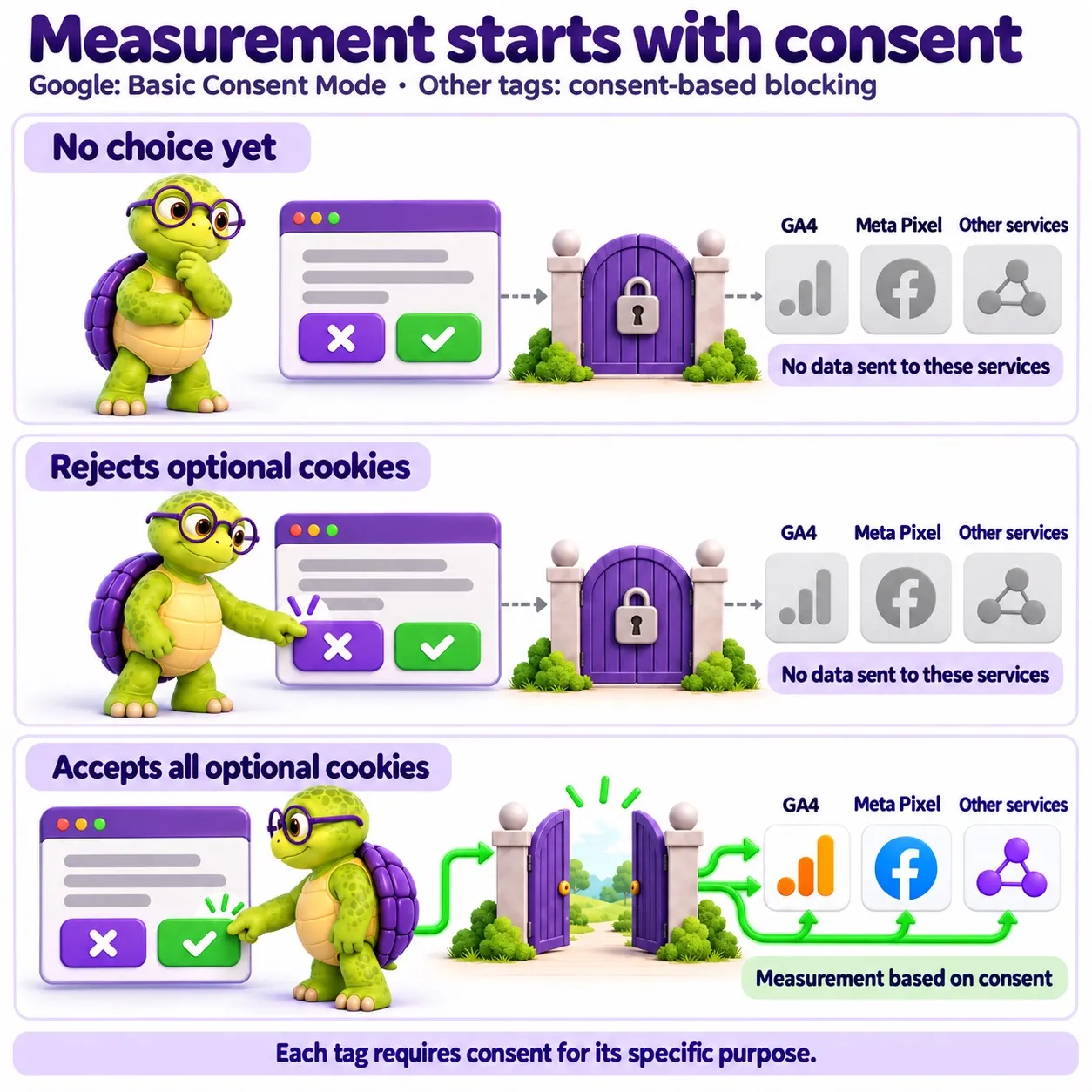
Basic: measurement starts after consent
Google tags remain blocked until consent has been given. Without consent, GA4 sends nothing to Google.
Advanced: limited signals without cookies
Google tags load before the visitor makes a choice. When the analytics default is denied, they can send limited measurements without analytics cookies. Acceptance permits the use of cookies. Google’s Basic and Advanced comparison
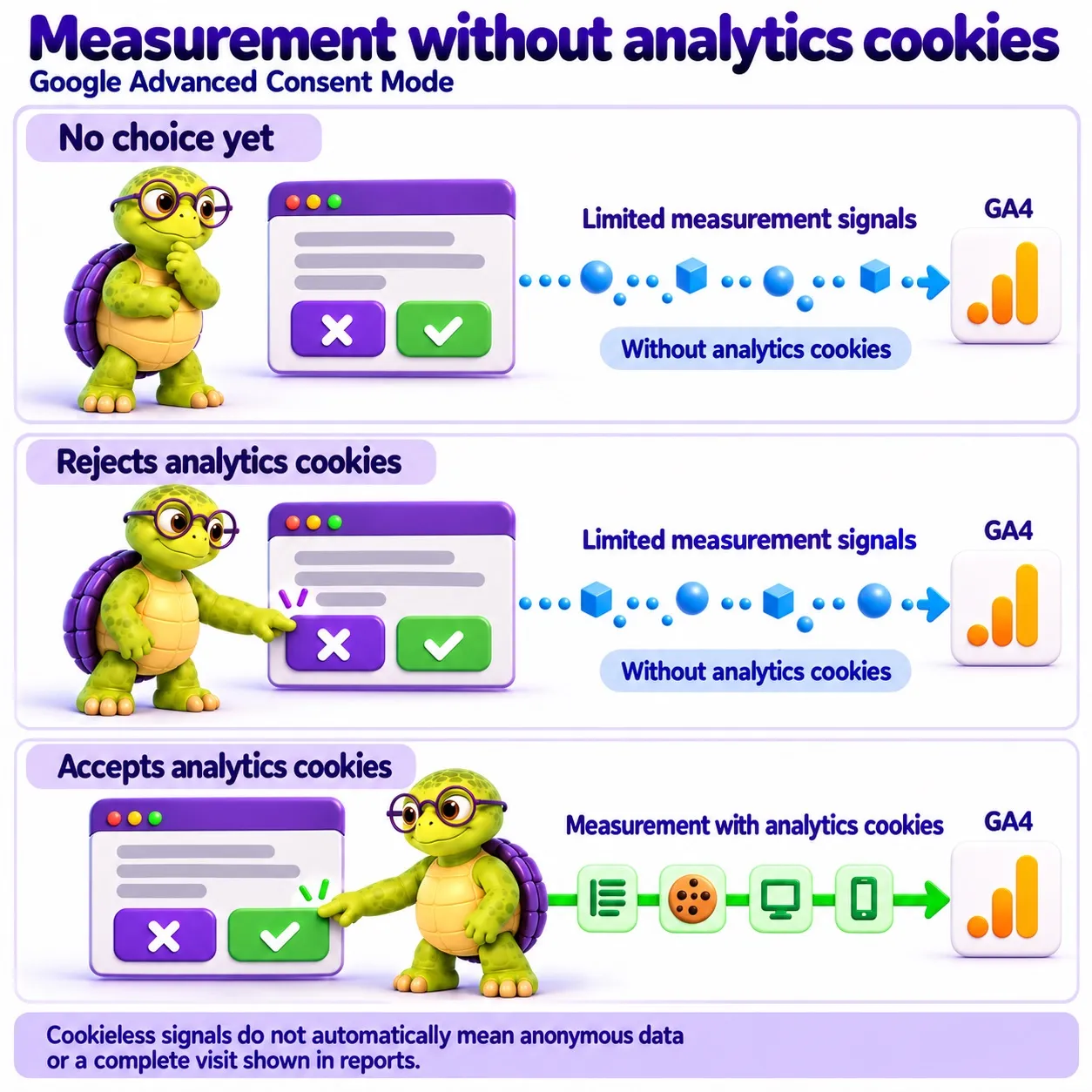
A Consent Mode setting in a CMP does not tell you which implementation is running on your website. Check the tag loading rules too.
Why is a sent event not a reported visit?
In an Advanced implementation, a browser sends a measurement request even after a visitor rejects analytics cookies. In reports, that visitor still does not appear the same way as a consenting user. Without a persistent identifier, GA4 cannot connect events to the same user. Google’s explanation of observed and modeled data
So test two things: whether the request goes out, and whether it shows up in the report you use.
Can GA4 fill in the missing traffic with modeling?
GA4 can estimate behavior that goes unobserved when consent is missing. It uses consenting users in the same property as its basis. Modeling requires an Advanced implementation and sufficient data:
- At least 1,000 events a day with
analytics_storage='denied'for at least seven days. - At least 1,000 daily users sending events with
analytics_storage='granted'on at least seven of the previous 28 days.
Meeting these conditions does not guarantee that modeling is on. According to Google, the model also considers, for example, the ratio of new to returning users and user and session counts. A small website easily falls below the thresholds, so check the situation in your own GA4 property.
Modeled data appears only when the reporting identity is set to Blended. It applies to metrics such as users, sessions and new users, not to event counts. BigQuery export does not support modeled data. Google’s modeling requirements and limitations
Modeling does not bring back all the missing information. It is an estimate, not a measured number.
How do you find out what caused the change in GA4 traffic?
Go through these:
- When measurement changed. Mark the dates of changes to the banner, CMP and tags on the chart.
- Behavior before and after the choice. How do the CMP and Google tags behave before a choice, after acceptance and after rejection?
- How consent reporting is defined. Which population does the CMP calculate the acceptance rate from?
- Technical measurement problems. Does the banner load and does the update event go out in time?
- Modeling status. Is modeling on, and does it show up in the report you use?
- Business figures. Compare store orders or CRM enquiries.
These figures are reference points. They do not tell you the absolute amount of website traffic, and they have their own limitations. Figures from after the measurement change are also not necessarily comparable with earlier ones.
A falling acceptance rate tells you to check measurement coverage. It does not, on its own, explain the whole traffic change.
Can measurement signals be sent without consent?
Not necessarily. Technical possibility and legal permissibility are different things. Advanced can technically send limited signals without cookies. That does not tell you whether it is allowed. The absence of cookies does not settle whether consent is needed, because access to information on a user’s device and the processing of personal data are assessed separately.
The European Data Protection Board’s final Guidelines 2/2023 concern Article 5(3) of the ePrivacy Directive. Protection of the device covers information regardless of whether it is personal data. The guidelines discuss pixel tracking, among other techniques. Final EDPB guidelines, especially paragraphs 6–10 and 47–55
The guidelines do not name Google Advanced Consent Mode or decide consent exemptions. My conclusion from these sources is that the absence of cookies or a persistent identifier does not establish that requests may be sent without consent.
What do Finnish authorities say?
Traficom’s cookie guidance also covers network-request-based tracking pixels, web beacons and tags. Any claim that analytics is necessary must be justified for the particular service. Traficom guidance, pages 3 and 7, in Finnish
In its decision concerning Foreca dated 12 June 2024, Traficom stated that merely asserting that users are not identified is insufficient. The decision mentions Consent Mode as a technical option, but does not assess Advanced cookieless requests. Foreca decision, page 26, in Finnish
I checked the Finnish authority publications on 22 October 2026. I did not find an explicit decision on Google Advanced Consent Mode. This is the result of a source search, so do not read the Foreca decision’s mention as approval. In Finland, Traficom supervises the use of information on terminal equipment, and the Data Protection Ombudsman supervises personal data processing. Traficom guidance, page 2
Why do national guidelines differ?
Authorities differ on what limited analytics may operate without consent. None of the following is an approval of Google Advanced mode.
- France, CNIL. Limited audience measurement may be exempt from consent if it serves only the publisher’s own need and produces anonymous statistics. The exemption does not automatically cover GA4. CNIL also forbids presenting the criteria as met by authority approval. CNIL, 4 July 2025
- Netherlands, ACM. Analytics cookies with little impact on privacy may be exempt from consent. Merely calling a service “cookieless analytics” is not enough for the exemption. ACM guidance
- Belgium, GBA/APD. According to the FAQ, there is no general exemption for analytics cookies, even first-party ones. The answer concerns cookies, not all cookieless implementations. GBA/APD, 17 November 2023
- Germany, Baden-Württemberg. An older FAQ describes legitimate interest in limited server-side analytics when no cookies are used and data is anonymized before disclosure. It does not cover Advanced requests sent directly from a browser to Google. Legitimate interest also does not override the consent requirement for device information. Authority FAQ
What should a marketing lead do?
Start by checking implementation and reporting. Consider changing the CMP only once the cause of the current problem is known.
- Record when measurement changed and what changed. Was a banner added, were tag loading rules changed, or was the CMP replaced?
- Ask the implementer to test three states: before a choice, after acceptance and after rejection. Also ask for a description of what the browser reads and sends, to whom, for what purpose and at what stage any anonymization happens.
- Ask for the CMP’s definition of the acceptance rate and its population.
- Mark the measurement change in reporting and tell readers about it. Numbers collected before and after the change may not be directly comparable. Do not present a corrected figure without justified assumptions.
When GA4 user counts fall after a banner change, ask first: what did the website send to Google before the change, and what does it send now?
For Cookiebot setup scripts and testing instructions, see the Cookiebot guide.
Source: https://karppinen.one/blog/how-cookie-consent-affects-ga4-data/
Issue breakdown
- WORDS
- 2,113
- Respectable amount of text.
- HEADINGS
- 14
- Loose structure.
- READ TIME
- 11 min
- You’ll survive.
- LINKS
- 14
- Paths to somewhere.
- CODE BLOCKS
- 0
- No terminal required.
- IMAGES
- 2
- Visual evidence included.


