Niko KarppinenPublished Updated
Create a McKinsey-style presentation with ChatGPT or Gemini
Build a McKinsey-style presentation your audience understands, with AI. Includes slide examples, SCQR, the Pyramid Principle, a copyable prompt and a slide test.

Ask AI to summarize:
 Add as source
If the slide title doesn’t tell you what’s going on, nobody reads the slide. The audience first has to work out what the metric means, what the chart shows and why they should care. By then, the speaker is already on the next slide.
This guide is for you if you present to people who don’t know your topic as well as you do. Consultant or in-house expert, it doesn’t matter. The example is website speed, but the same approach works for any data.
Skip straight to the copyable prompt.
We consultants talk about topics we know inside out. That’s why we forget they are new to the audience. Once you’ve said LCP a few hundred times, it sounds like everyday language. To the audience, it’s three letters.
Spelling out the abbreviation doesn’t help. Largest Contentful Paint is three words of jargon instead of three letters. Explain what the concept means and why it matters for this particular question.
This is where the action title of a McKinsey-style presentation helps. The title states the key finding right away, and the slide shows what it is based on. Read only the titles in order and you get the whole argument. The details are there for anyone who wants them.
ChatGPT, Gemini or Claude can build this kind of presentation, as long as it knows more than the numbers: who you’re talking to, why, and what you want them to understand. The prompt in this guide asks for these before a single slide is made. Judging the draft is still your job. AI is a good servant but a bad master.
Why does a McKinsey-style presentation work?
A good consulting presentation saves the audience work on the way from numbers to a conclusion. A clean chart can show the numbers clearly and still not say what to make of them. The presenter has to say what in the data answers the question and how far you can take it.
Same numbers, different amount of work for the reader
Let’s look at two slides built from the same fictional numbers. The numbers show how long it takes from the start of the page load until the largest visible content element appears. The metric is called LCP, Largest Contentful Paint.
A reporting slide shows the measurements
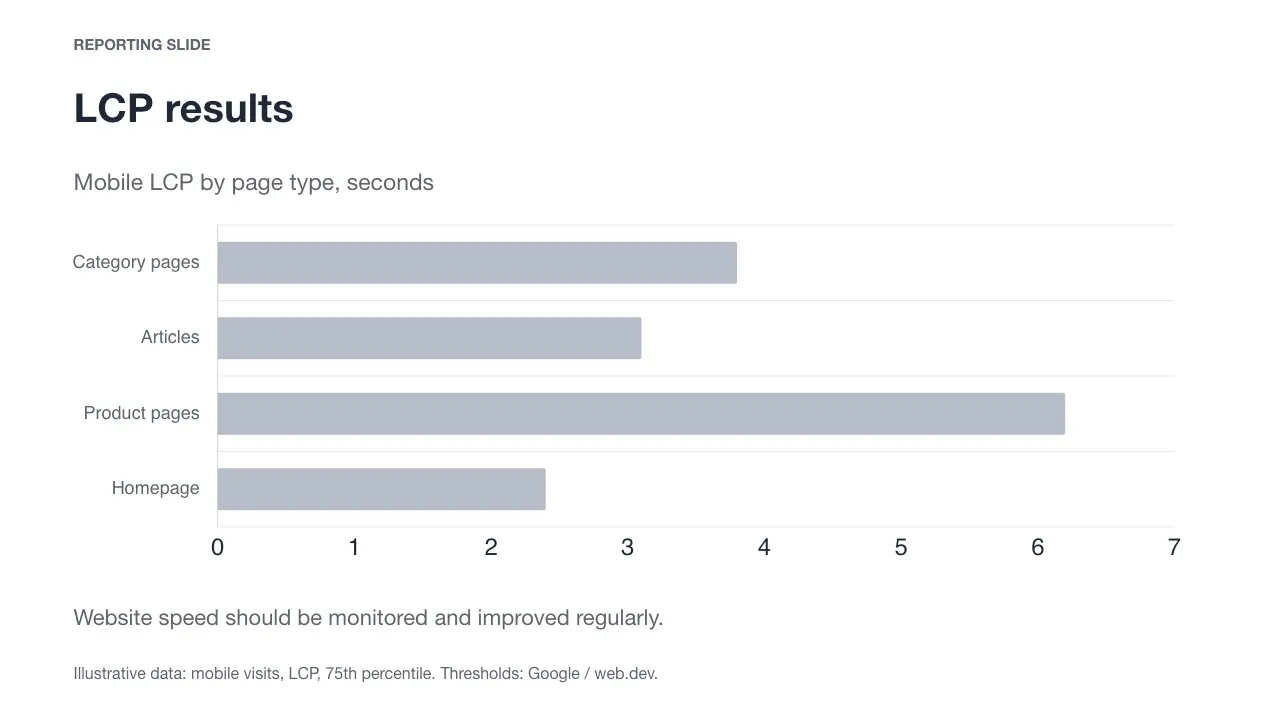
The chart shows that the product pages bar is the longest. For an expert who knows the metric, that’s enough for regular monitoring. Everyone else is left wondering: What is LCP, is a bigger number good or bad, and what should the result be compared to? Like a shopping mall map without the “You are here” dot.
The closing suggestion to monitor site speed is just as vague. It doesn’t say where to start.
An analysis slide helps interpret the numbers
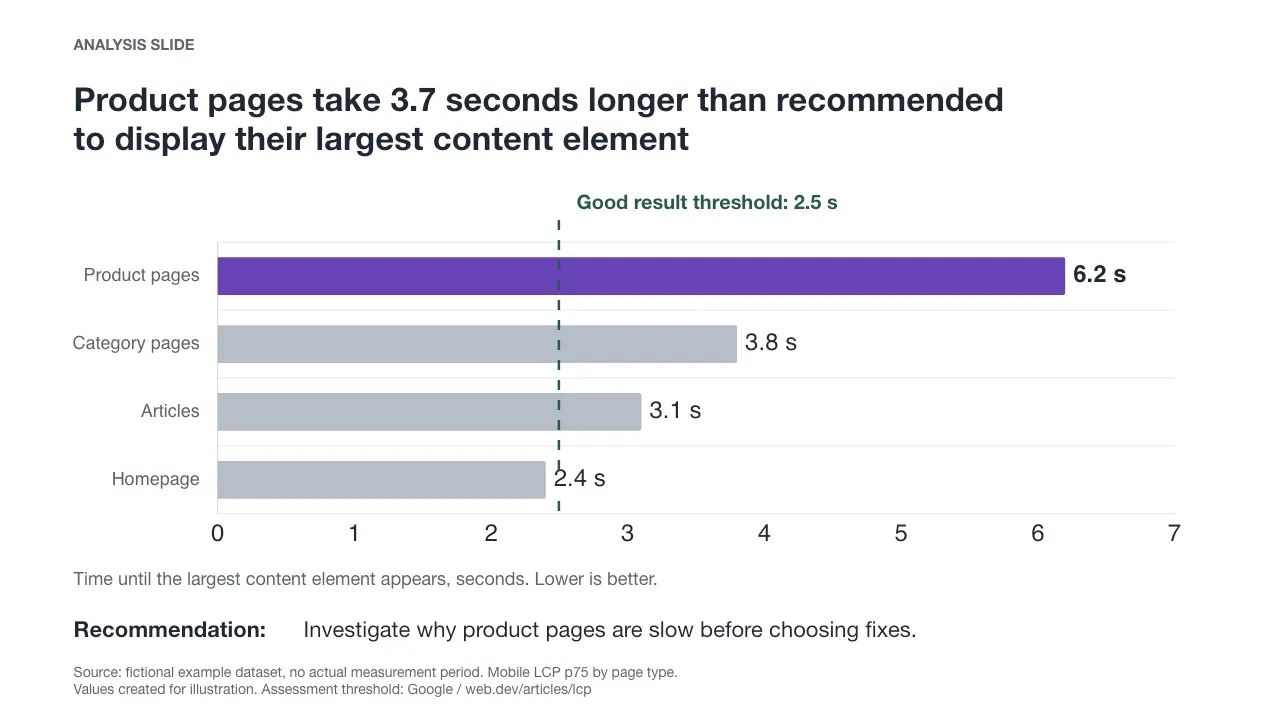
You can understand the title without knowing what LCP stands for. The 2.5-second threshold gives the numbers a benchmark. Sorting the bars makes comparison easier, and the purple highlight draws attention to product pages.
Both slides use the same example numbers:
| Page type | Mobile LCP, 75th percentile |
|---|---|
| Product pages | 6.2 seconds |
| Category pages | 3.8 seconds |
| Articles | 3.1 seconds |
| Homepage | 2.4 seconds |
The numbers don’t come from a real website and have no measurement period. The threshold for a good LCP, 2.5 seconds or less, comes from Google’s LCP guidance. The 75th percentile is the value that 75 percent of observations fall at or below. So the 6.2-second example for product pages doesn’t mean every visit loads in the same time, or that the whole page has finished loading.
The reporting slide is fine for monitoring. The analysis slide is for when someone has to decide something based on the numbers.
What should the title say?
“LCP results” names the topic. It doesn’t yet say what to notice in the results.
An action title states a finding, and the slide shows whether it holds. That’s why the title and the chart are designed together.
If the title claimed that product images cause the slowness, the data in this example wouldn’t prove it. The chart shows the difference between page types, but not its cause. That’s why the recommendation is to find the causes before choosing fixes.
Not every slide needs its own recommendation. One slide can identify the problem, the next can look at its causes and a third can compare solutions. You should be able to follow the argument from the titles alone.
What does your audience already know?
Before choosing your words, you need to know who you’re talking to. A marketing director and a web developer may need a different presentation from the same data. A job title still doesn’t tell you what a person knows about the topic.
Find out what the audience already knows, which concepts need explaining and what you want them to understand or decide. If you’re not sure about their starting point, ask the client or someone who knows the audience.
While preparing, you can judge whether the audience has what it needs to follow your reasoning. Whether they actually understand it only shows in their feedback and the discussion.
I made the example slides for this article in conversation with AI. The first analysis slide had LCP in the title, and the chart had no threshold. It looked clean but asked too much background knowledge from the reader. I gave feedback, and the AI fixed it.
Build the argument before the slides
SCQR, the Pyramid Principle and action titles help you plan the whole before you open PowerPoint. When I say McKinsey-style, I mean this approach to consulting communication. This is not McKinsey’s official presentation template.
SCQR frames the situation and the question to answer
SCQR stands for Situation, Complication, Question and Resolution. It helps you describe why the presentation is needed and which question it answers.
| Part | Role | Example from the same fictional data |
|---|---|---|
| Situation | Defines what is being looked at. | “We assessed the mobile speed of the site’s page types.” |
| Complication | Brings out the problem. | “Product page LCP is 6.2 seconds, while the threshold for a good result is 2.5 seconds.” |
| Question | Frames the next decision. | “Where should the performance investigation focus first?” |
| Resolution | Gives an answer the data supports. | “Investigate why product pages are slow before choosing fixes.” |
The Pyramid Principle orders the answer and its support
In the Pyramid Principle, the main message comes first. Supporting arguments are grouped under it, and the evidence under them. The principle was developed by Barbara Minto.
The main message in the example could be: “Focus the first performance investigation on product pages.” Two arguments support it: product pages have the weakest result in the comparison, and they exceed the good-result threshold by 3.7 seconds. The evidence is the measurements by page type and the definition of the threshold.
SCQR shapes the question and the answer. The Pyramid Principle orders the arguments.
A ghost deck shows whether the argument holds
Before making the slides, write their titles in order. This draft is called a ghost deck. Next to each title, note the data you’ll use to back it up.
If a step in the reasoning is missing between titles, or a claim has no evidence, fix it now. Changing a table row is easier than rebuilding a finished slide.
From the same fictional data, a four-slide title chain could look like this:
| Slide | Title | Role and reasoning |
|---|---|---|
| 1 | The largest content element on product pages appears only after 6.2 seconds | Shows the problem by comparing the result with other page types and the 2.5-second good-result threshold. |
| 2 | Comparing page type speeds doesn’t yet explain the slowness | Sets the limits of what the data tells us. Load times alone don’t show what slows loading down. |
| 3 | The causes of slow product pages must be found before choosing fixes | Justifies the proposed investigation. The recommendation assumes the fix should target a confirmed cause. |
| 4 | A product page performance investigation is proposed for approval | Brings a decision proposal to the audience. The decision still needs a scope, cost and timeline. |
With this information, the last slide wouldn’t be ready for a decision. You’d need to get the missing details or change the meeting’s goal to agreeing on the scope of the investigation. The ghost deck helps you notice this before building finished slides.
A good slide also shows where its conclusions come from
A source note helps the audience judge a number. It should state where the data comes from, the period, the limits and any significant processing. Keep the source of the measurement separate from the source of the benchmark.
In this article’s example, the numbers are fictional. Google is the source of the LCP definition and threshold. In a real presentation, you’d also note the measurement period and whether the data covers mobile visits, individual pages or page types.
If you calculated or grouped the results yourself, describe the method. A fuller description can go in the appendix, as long as the slide shows the limits that matter for interpretation. A long source note alone doesn’t make the data reliable.
Separate observation, calculation, possible explanation and recommendation
Each plays a different role in the argument:
| Claim type | Example | What to check? |
|---|---|---|
| Observed in the data | Product page LCP is 6.2 seconds. | Which visits and which period does the number describe? |
| Calculated or inferred from the data | The result exceeds the 2.5-second threshold by 3.7 seconds. | Are the calculation, units and benchmark correct? |
| Possible explanation | Heavy product images may slow down how quickly the content element appears. | This is an assumption to investigate. The current comparison doesn’t show the cause. |
| Recommendation | Investigate the causes of slow product pages first. | Why is this the right next step, and on what assumptions? |
Consider other explanations too. If product pages are browsed more often on weak mobile connections, the difference may come from the users, not the page template. Find out what data would tell these apart. The title must not claim more than the data supports.
Check what the data actually describes
Compare the source, period, number of observations, unit of analysis and calculation method with what the title claims. A result for the whole domain doesn’t describe product pages as such, and a short measurement period doesn’t show a full year’s trend.
Nor does the average of individual pages’ p75 values usually equal the real 75th percentile of a page type. A group result needs suitable data and a defined calculation method. If the method isn’t known, mark it as an open question.
A source note for your own real user monitoring (RUM) data could look like this:
Source: own RUM data, [measurement period]. Mobile, LCP p75. Page types grouped by URL path. Sample: [number of page loads].
This is a template to fill in. Replace the bracketed details with real ones. Describe the grouping and the measurement method to match your own data.
Create your own presentation with AI
AI quickly drafts findings, suggests a structure and sketches slides. You provide the context and judge the result. Watch out for fluent titles in particular, because they easily promise more than the numbers can hold.
The audience also needs to be able to challenge the conclusion. That’s why sources, benchmarks and uncertainties need to show in the AI’s draft too.
The prompt below works in three rounds: context, storyline and slides. At the end of each round, the AI waits for your feedback. In the third round, you approve one sample slide first, so you don’t have to fix the same presentation problems across the whole deck.
1. Gather your material
Collect the report, audit, spreadsheet or notes you want to present. Include sources, periods and any limits you know of. If the data is preliminary, say so.
Before uploading, remove any confidential information your company doesn’t allow in AI tools.
2. Copy the prompt into ChatGPT, Gemini or Claude
Paste your material into the same conversation. The prompt tells the AI to ask for missing context and to check both the reasoning and the formatting.
You will help me build a presentation using consulting communication methods: SCQR (situation, complication, question, resolution), the Pyramid Principle and action titles.

Work in three rounds. Stop at the end of each and wait for my reply.

ROUND 1: MATERIAL AND THE AUDIENCE'S STARTING POINT
Read my material. Then ask only about what is unclear, one question at a time and no more than five questions at first. Find out:
- who the presentation is for, what the audience knows about the topic and what that assessment is based on
- what I want the audience to understand or decide
- the key findings, sources, periods and limits of the data
- my own recommendation, if I have one
- the language, setting, length and any required content.
Do not infer the audience's starting point from job titles alone. Find out which concepts need explaining. Separate known context from assumptions. If something essential remains open, ask about it before moving on.
Check that the source, period, unit of analysis, data coverage and calculation method fit the intended claim. Do not calculate a page type's percentile by averaging the percentiles of individual pages. If the method is not known, mark it as an open question.
Summarise your understanding and ask me to confirm it.

ROUND 2: STORYLINE AND GHOST DECK
Before the storyline, classify the key claims in a table:
Claim | Category | Evidence or calculation | Assumptions and gaps
Use these categories: observed directly in the data, calculated or inferred, possible explanation, recommendation.
Identify plausible alternative interpretations for the key conclusions. Say what additional data is needed to tell them apart. Do not invent alternatives without grounds. State the strongest claim the data supports and narrow it if the evidence falls short.
If decisive information is missing, ask for it or propose a narrower presentation goal before building the storyline.

1. Write the main message: one sentence that answers the question to be resolved.
2. Write the SCQR, one sentence for each part.
3. Group the arguments that support the main message into 2–4 blocks. Avoid overlap and check whether an essential argument is missing.
4. Build the ghost deck as a table:
   No. | Slide's role | Action title | Evidence | Visualisation and benchmark | Source and limits
   - One main message per slide.
   - Word the titles to match the audience's starting point. Explain the necessary technical terms.
   - Use a title that states the conclusion on analysis slides. A background slide can simply name its topic.
   - Decide the number of slides based on the length and content. Put extra analyses in the appendix.
   - Not every slide needs a recommendation. Move from findings towards the intended decision or understanding with clear reasoning.
5. Check the progression of the titles, the evidence for each claim and the prior knowledge required of the audience. Point out missing steps in the reasoning.
Ask what to change. Do not make slides until I approve the storyline.

ROUND 3: SLIDES AND QUALITY CHECK
First make one analysis slide from the approved ghost deck as a sample. It must include the title, evidence, the necessary benchmark and a source note. Also show the visual design if your tool can.
Stop and wait for my approval. Revise the sample slide based on my feedback. Do not make the remaining slides before the sample slide is approved.
Then build the remaining slides following the agreed structure and style:
- a title that matches the slide's role and the audience's starting point
- a chart, table, image or short text that supports the title
- units for numbers, and the thresholds or other benchmarks needed for interpretation, visible
- a source note with the data's origin, period, limits and significant processing
- speaker notes of 2–4 sentences.
Keep the data source separate from the source of the benchmark. Suggest the next action when it belongs to the slide's role.
Also check each claim's unit of analysis, period and calculation method against the source notes. Make the uncertainties that affect interpretation visible.

FORMATTING
- Use my presentation template if I have provided one. Otherwise use a light background, a limited colour palette and one or two font families.
- Highlight only what matters. Colours and icons must have a consistent meaning. Do not convey information by colour alone.
- Aim for titles of no more than two lines and a consistent title size on comparable slides. Shorten before reducing the font size. If forcing two lines hurts clarity, propose a justified exception.
- Align titles, sources, slide numbers and other recurring elements in the same positions. Stay within the margins.
- Ensure readable text size, contrast and enough spacing. Remove overlaps.
- Place labels close to what they describe. Use order and highlights to reveal the findings.
- Use numbering when the order matters. Otherwise use bullet points.
- Icons must aid understanding and follow one style. Remove unnecessary decoration, animations and repeated text.

CHECK BEFORE HANDING OVER
1. Starting point: what prior knowledge does each slide require? Provide the necessary background and explain terms. Flag requirements that exceed the audience description you were given. Do not claim the audience will understand the presentation.
2. Evidence: does the data support the claims? Are units, benchmarks, sources and limits visible? Is a correlation presented as a cause without evidence?
3. Visualisation: do the chart, order and highlights help assess the title's claim?
4. Formatting: check text fit, readability, margins, alignment and the consistency of recurring elements.
5. Progression: remove repetition, check the reasoning steps and move details the main message doesn't need to the appendix.
Also answer three questions for each analysis slide:
- What should the audience take from this? Name the main message and check the wording against the audience's described starting point.
- Why is the claim justified? Name the evidence, benchmark, limits and necessary assumptions.
- How does this move the presentation forward? Describe the slide's link to the next argument, decision or intended understanding. Do not force a separate recommendation onto every slide.
Fix the problems and re-check the slides you changed.
Report unresolved problems in this format:
Slide | Problem | Impact | Required fix
If you cannot check the actual visual layout, say so. Do not claim to have done a visual check based on text alone.

RULES FOR THE WHOLE TASK
- Do not invent numbers, sources, dates or quotes. Mark a gap as [MISSING DATA: what] and explain how it limits the conclusion.
- Separate the facts in my material from assumptions, interpretations and recommendations. Mark fictional data.
- If the data does not support my recommendation, say so and propose a course of action the data supports.
- Plain language, no buzzwords or filler.
- If your tool supports presentation files, create a downloadable .pptx or another format the tool supports. Otherwise give the content ready to paste and state the limitation.
3. Answer the questions and fix the storyline
Using the same fictional performance example, you could answer like this:
- Desired decision: approve a closer investigation of product page performance before choosing fixes.
- Audience: the people responsible for marketing and technology. Check separately whether they know the LCP metric and its thresholds.
- Key findings: product page mobile LCP p75 is 6.2 seconds, the homepage’s 2.4 seconds. The threshold for a good result is 2.5 seconds. This comparison doesn’t show the cause of the slowness.
- Recommendation: first find out what slows down the rendering of the largest visible content element on product pages.
- Format: English, a 15-minute presentation followed by discussion.
Read the ghost deck titles in order. Check that no reasoning is missing between them. Go through every [MISSING DATA] note: provide the missing information, narrow the claim or remove it.
4. Build the slides and check the file
Once you approve the storyline, ask for one sample slide first, in a format your tool supports. Check its title, benchmarks, highlights, source note and text readability. Give feedback and approve the style before the other slides are made.
Not every service can create a presentation file. If no file is created, ask for the slide content and the chart source data separately. In that case, you can check the layout only once the slides are designed.
Open the finished file. Check every number against its source and every slide in the format you’ll present or share it in. The AI’s own check doesn’t replace this step.
The three-question slide test
Run every analysis slide through these questions before the detailed formatting check:
- What should the audience take from this? Write the main message in one sentence. Check whether the title expresses it and what prior knowledge its wording requires.
- Why is the claim justified? Point to the data, benchmark and limits that support it. If you can’t, get more evidence or narrow the claim.
- How does this move the presentation forward? Name the link to the next argument, decision or intended understanding. Not every slide needs its own action proposal.
This is the author’s check of the presentation’s structure and reasoning. It doesn’t yet show how the audience will read it.
I’d recommend one more test: Show the draft to one person who represents the audience and ask them to tell you in their own words what they conclude from it. If their answer differs from your main message, fix the titles and explanations.
Source: https://karppinen.one/blog/mckinsey-style-presentation-chatgpt-gemini/
Issue breakdown
- WORDS
- 3,629
- Respectable amount of text.
- HEADINGS
- 19
- Loose structure.
- READ TIME
- 18 min
- You’ll survive.
- LINKS
- 5
- Paths to somewhere.
- CODE BLOCKS
- 1
- Mildly technical.
- IMAGES
- 2
- Visual evidence included.